SEOMate transforms any web image into copy-ready meta-data, alt-text, file names, and tags using advanced AI — right from your browser.
Add to Chrome — It's FreeNo credit card required · Works on any image
Stop guessing keywords. Let AI write your SEO metadata while you focus on photography.
Works directly from your browser context menu. No copy-paste, no uploads — just right-click and generate.
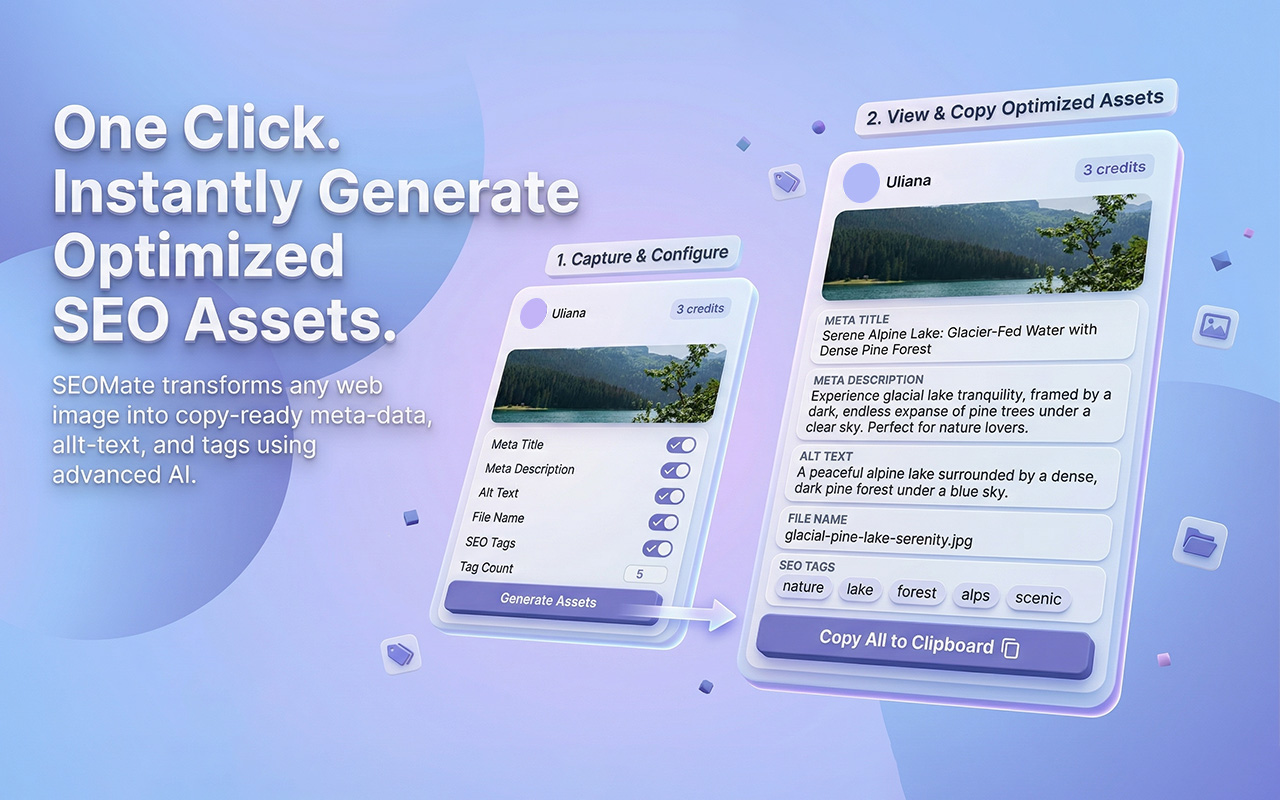
Generates a meta title, meta description, alt text, SEO file name, and keyword tags — all optimized for your image.
One-click copy puts everything on your clipboard, ready to paste into Lightroom, Squarespace, WordPress, or any CMS.
Your last 3 generations are saved automatically so you can revisit or copy assets from previous sessions.
Sign in with Google. Your data is encrypted in transit and at rest. Image content is never stored — only the URL.
Start free. Buy credit packs via Gumroad when you need more — no subscriptions, no recurring charges.
Three steps from image to optimized SEO copy.
On any webpage, right-click an image and select Generate SEO Assets from the context menu.
SEOMate analyzes the image and page context, then returns 5 fully optimized SEO fields in seconds.
Hit "Copy All to Clipboard" and paste your ready-to-use metadata into your portfolio, CMS, or photo platform.